U020C Lost Communication With Wireless Accessory Charging Module means one or more vehicle control modules can no longer exchange messages with the module that manages the wireless phone-charging pad. In most cases, the fault is caused by a blown fuse, low system voltage, wiring or connector damage, or a failed charging module—not by the phone itself.
This is an informational, diagnostic search intent: the priority is to understand the code and test the vehicle correctly before buying parts. Because the exact module name and network design vary by manufacturer, the wiring diagram and factory service information for the specific vehicle remain essential.
What Does U020C Mean?
U020C is a network communication diagnostic trouble code. The letter U identifies communication faults between electronic control modules, while U020C points to a lost connection with the wireless accessory charging module, commonly called a wireless charging module, wireless charging pad module, or WACM.
The charging module does more than create a magnetic field for a compatible smartphone. It may monitor charging temperature, foreign objects, input voltage, pad status, and communication with the infotainment or body control system. When another module stops receiving expected messages, it stores U020C.
The code does not automatically prove that the charging pad is defective. A module that has lost power, ground, or access to the vehicle’s CAN network can produce exactly the same code as an internally failed module.
Common Symptoms of U020C
Symptoms depend on how the manufacturer uses the charging module and whether U020C is active or stored as a history fault. Typical signs include:
- The wireless charging pad does not charge a phone.
- A charging indicator is dark, flashes, or displays an error.
- The infotainment screen reports wireless charging, accessory, or module communication faults.
- A phone repeatedly starts and stops charging.
- Foreign-object detection or charging-temperature warnings appear.
- The check engine light, service warning, or a general electrical warning is illuminated.
- Additional U-codes appear because other modules also lost network communication.
Some vehicles will continue to drive normally because the wireless charging system is a convenience feature. That does not make the code irrelevant: a broader power or CAN-bus fault can eventually affect other vehicle functions.
Most Likely Causes of U020C
1. Power supply or ground failure
A charging module usually receives battery or accessory power through a dedicated fuse. A blown fuse, corroded fuse terminal, loose ground, or an ignition-feed problem can make the module appear completely offline. Check the fuse with a test light or meter under the correct operating conditions; visual inspection alone can miss a poor connection.
2. Low battery voltage
Weak batteries and voltage drops during starting can create several communication codes at once. If the vehicle recently needed a jump-start, had a discharged battery, or shows multiple unrelated U-codes, measure battery voltage and charging-system output before condemning the charging module.
3. Damaged CAN wiring or connectors
The wireless charging module communicates through the vehicle network, often using CAN-H and CAN-L circuits. A pin pushed backward in a connector, liquid under the center console, a damaged harness, or an aftermarket accessory spliced into the network can interrupt communication.
4. Software or configuration problem
Module replacement may require software programming, configuration, or a vehicle-specific initialization procedure. A module can have correct power and network wiring but still fail to communicate after an incorrect replacement or an interrupted software update.
5. Failed wireless charging module
Internal electronic failure is possible, particularly after liquid exposure, overheating, or a power surge. It should be considered only after power, ground, network resistance, connector condition, and software requirements have been checked.
How to Diagnose U020C Properly
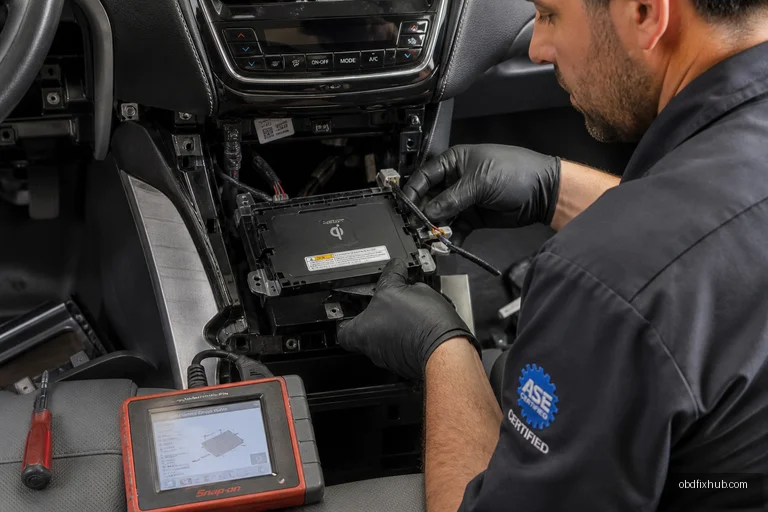
Use a scan tool capable of accessing all vehicle modules, not only the engine computer. A basic code reader may display U020C but cannot show whether the charging module is online, whether the fault is current, or which other module first reported the communication loss.
- Record every code and freeze-frame detail. Scan the body, infotainment, gateway, and charging modules. Note battery voltage, ignition status, and whether U020C is active or history.
- Check the vehicle battery and charging voltage. Correct low voltage or unstable alternator output before continuing. Communication testing performed on a weak battery often produces misleading results.
- Inspect the relevant fuses. Use the owner’s manual or service diagram to identify the charging module’s power feeds. Test both sides of each fuse with the circuit switched on.
- Verify power and ground at the module. A meter should be used under load where appropriate. A ground can show continuity with no load and still fail when the module attempts to operate.
- Inspect connectors and harness routing. Look for moisture, green corrosion, bent terminals, loose locks, crushed wires, and accessories installed near the center console.
- Test the communication network. With the vehicle powered down according to manufacturer instructions, network resistance and voltage checks can identify an open, short, or termination problem. Follow the service manual because sleep-mode timing and test points differ by vehicle.
- Attempt module communication with the scan tool. If the module cannot be identified while its power and network circuits are correct, suspect a programming issue or internal module failure.
- Clear codes and perform a road or functional test. Place a compatible phone on the pad, confirm charging status, rescan all modules, and verify that U020C does not return.
Repair Options for U020C
The correct repair depends on the failed test, not merely on the code description. A blown fuse should be replaced only after finding why it opened. If a new fuse fails immediately, stop replacing fuses and locate the short circuit.
- Repair damaged CAN-H, CAN-L, power, or ground wiring using proper automotive repair procedures.
- Clean or replace corroded terminals and secure loose connectors.
- Repair water leaks or spills that reached the center console or charging pad.
- Update or configure the module when a manufacturer bulletin specifies a software remedy.
- Replace the wireless charging module when it has verified power, ground, and network access but remains nonresponsive.
Many replacement modules require programming or a vehicle configuration routine. Installing a used unit may not work if the part number, software level, or vehicle configuration is incompatible. Confirm the exact part and programming requirements before purchase.
What Is Wireless Communication?
Wireless communication transfers information without a physical conductor, using radio waves, infrared light, cellular signals, Wi-Fi, Bluetooth, or similar technologies. A phone charging wirelessly uses electromagnetic induction or, in newer systems, magnetic alignment to transfer energy; that power transfer is different from the vehicle’s wired CAN communication used to supervise the charging module.
Benefits of Wireless Communication
- It reduces physical cables and makes portable devices easier to use.
- It supports mobility in vehicles, homes, workplaces, and public spaces.
- It allows devices such as phones, sensors, and accessories to connect quickly.
- It can simplify installation where running cables is difficult or expensive.
- Wireless charging keeps a compatible phone powered without repeatedly plugging in a connector.
What Are the Disadvantages of Wireless Communication?
Wireless systems are vulnerable to interference, range limitations, signal blockage, congestion, and security risks. Wireless charging is also less efficient than wired charging, can generate more heat, and may stop if the phone is misaligned or a metal object is detected.
In a vehicle, another disadvantage is diagnostic complexity. The charging experience feels wireless to the driver, but the module still depends on fuses, grounds, connectors, software, and a wired vehicle network. A fault in any of those areas can trigger U020C even when the phone and charging pad appear physically undamaged.
Applications of Wireless Communication
Wireless communication is used in cellular networks, Wi-Fi, Bluetooth accessories, keyless entry, tire-pressure monitoring, GPS systems, industrial sensors, smart-home equipment, medical devices, and vehicle infotainment. In the automotive environment, wireless charging is one application, while the charging module’s status is commonly reported across the vehicle’s internal wired data network.
When Should You See a Professional?
Professional diagnosis is advisable when U020C appears with several network codes, the vehicle has water damage, a fuse repeatedly blows, or the module needs programming. CAN-bus testing performed incorrectly can disable communication with multiple systems, so do not probe network wires with a powered test light or short circuits together.
If the vehicle drives normally and only the charging pad is unavailable, the repair may not be urgent, but it should still be addressed if the code is active. If steering, braking, airbag, powertrain, or gateway communication codes are also present, treat the situation as a broader electrical fault and arrange diagnosis promptly.
Key Takeaway
U020C means the vehicle has lost communication with its wireless accessory charging module. Start with battery voltage, fuses, power, grounds, connectors, and CAN wiring before replacing the charging pad. A complete all-module scan and a vehicle-specific wiring diagram are the fastest ways to separate a simple supply problem from a failed or unprogrammed module.
Frequently Asked Questions
Can I drive with the U020C code?
Usually, yes, if the only symptom is an inoperative wireless charging pad and no safety-related codes are present. Have the vehicle checked promptly if multiple communication faults or other warning messages appear.
Will replacing the wireless charging pad fix U020C?
Not necessarily. The fuse, ground, wiring, CAN network, or software may be the real cause. Test those circuits first, and verify whether the replacement module requires programming.
Can a weak car battery cause U020C?
Yes. Low voltage during starting or unstable charging voltage can make control modules go offline and store communication codes. Battery and alternator tests should be part of the initial diagnosis.
Is U020C caused by an incompatible phone?
An incompatible or poorly aligned phone can prevent charging, but it normally does not cause a lost-communication code by itself. U020C concerns communication between the vehicle modules, not the phone-to-pad charging connection.