P0D56 Electric Vehicle Proximity Detection Circuit: Meaning, Causes, Symptoms & Fix
P0D56 means the vehicle has detected a problem in the Proximity Detection Circuit A, a circuit used to determine whether a charging connector is present and safely latched. In practical terms, the EV may refuse to start charging, display a charge-port warning, or prevent the vehicle from being shifted into Drive. The code usually points to the charge inlet, charging cable, wiring, or the module that monitors the proximity signal—not automatically to a failed high-voltage battery.
What Is the P0D56 Proximity Detection Circuit?
The proximity circuit is part of the EV charging interface. Depending on the vehicle and connector standard, it uses a resistor, switch, or coded resistance signal to tell the car that a plug is inserted and, in some systems, that the connector latch or release button has been operated.
This signal is separate from the main charging power lines. A vehicle can therefore have normal high-voltage battery operation while still logging P0D56 because it cannot reliably identify the charging plug. The exact circuit design differs between manufacturers, so the wiring diagram and factory service information matter more than a generic resistance chart.
Do not assume that every P0D56 has the same meaning on every make. Some manufacturers label the circuit as Proximity Detection Circuit A, while others integrate it into the charge-port control module or onboard charger. Always verify the code description with a scan tool that supports the specific vehicle.
Common Symptoms of P0D56
The symptoms often appear only when the vehicle is connected to an EVSE. This can make the problem seem intermittent, especially when the car drives normally after the cable is removed.
- The vehicle will not begin AC charging.
- The charge-port indicator flashes red, amber, or shows a fault symbol.
- The dashboard reports a charging-system or plug-detection warning.
- The connector remains locked or will not release normally.
- The vehicle incorrectly reports that no cable is connected.
- Charging starts and stops when the connector or cable is moved.
- The vehicle will not shift into Drive because it believes the charging cable is still attached.
- P0D56 returns immediately after clearing or returns only during a charging attempt.
A useful diagnostic clue is timing. If the code appears as soon as the connector is inserted, inspect the proximity circuit and inlet first. If it appears after several minutes of charging, also consider moisture, thermal expansion, a loose terminal, or a charging cable whose internal pilot components fail under load.
Most Likely Causes of P0D56
1. Damaged or contaminated charge-port connector
Road salt, water, dust, and corrosion can affect the small signal terminals inside the charge inlet. These pins carry low-current information, so a terminal may look almost clean while still producing unstable voltage. Inspect for green corrosion, pushed-back pins, bent contacts, cracked plastic, or evidence that the inlet has been forced.
2. Faulty charging cable or EVSE connector
The proximity components may be built into the charging handle or cable assembly. A cable can deliver power correctly and still have a defective proximity resistor or switch. Testing with a known-good, compatible cable is one of the fastest ways to separate a vehicle-side fault from a cable-side fault.
3. Open, shorted, or high-resistance wiring
Wiring between the charge inlet and the charge-port control module can be damaged by vibration, previous body repairs, rodents, or water intrusion. A partially broken conductor may pass a static continuity test but fail when the connector is moved. Voltage-drop and wiggle testing are more informative than simply checking whether a wire beeps on a multimeter.
4. Charge-port latch or proximity switch failure
On some EVs, the connector latch mechanism includes a switch that changes the proximity signal. A mechanically stuck latch, weak spring, broken actuator, or misaligned inlet can create P0D56 even when the electrical wiring is intact. Check whether the cable locks and releases consistently without excessive force.
5. Software or module-related problems
The charge-port module, onboard charger, body control module, or energy management controller may misinterpret a valid signal. A software update, lost calibration, or communication fault can occasionally set the code. This possibility should be considered after basic connector and wiring checks—not used as a reason to replace a module immediately.
How to Diagnose P0D56 Correctly
- Record all codes and freeze-frame data. Scan every relevant module, not only the generic OBD-II engine menu. Codes relating to the onboard charger, latch, pilot signal, or low-voltage system may identify the root cause.
- Check the 12-volt battery. Low auxiliary voltage can cause charging-control modules to behave unpredictably. Test the battery at rest and during the charging wake-up sequence, following the manufacturer’s specifications.
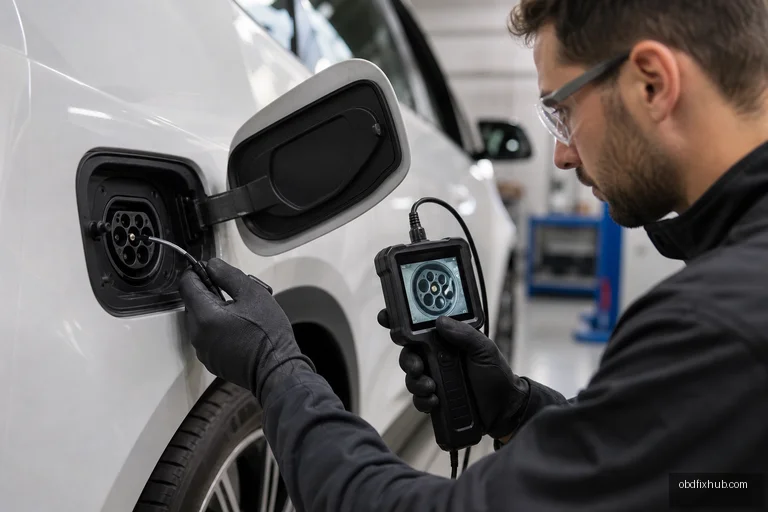
- Inspect the cable and inlet. Look for moisture, debris, damaged seals, bent terminals, melted plastic, and a connector that does not fully seat. Never insert probes or tools into a high-voltage charging contact.
- Compare cable behavior. Try a verified compatible EVSE or charging cable. If the fault follows one cable, the cable is the leading suspect; if every cable produces the same fault, focus on the vehicle.
- Read live data. Many professional scan tools show plug-present, latch position, proximity status, pilot status, and charge-port lock commands. Compare the data before insertion, after insertion, and while gently moving the connector.
- Test the circuit using the wiring diagram. Measure the specified resistance or voltage only at the approved test points. Proximity resistance values vary by connector design, cable rating, and manufacturer, so guessing a universal value can produce a false diagnosis.
- Check continuity under movement. Back-probe the low-voltage circuit where permitted, then perform a controlled wiggle test at the inlet, harness bends, and module connector. Any sudden change indicates a terminal or conductor problem.
- Clear the code and repeat the original condition. After repair, reconnect the same type of EVSE, lock and unlock the connector, and confirm that charging begins normally. A successful code clear without a charging test is not a complete repair.
How to Fix P0D56
The correct repair depends on the failed part. Clean minor contamination with an approved electrical-contact cleaner only after following the vehicle’s service procedure; do not scrape terminals or spray household lubricants into the inlet. Replace terminals, seals, or a short harness section when corrosion or looseness is present, rather than relying on a temporary bend or tape repair.
If testing proves that the charging cable’s proximity circuit is defective, replace or professionally repair the cable according to the EVSE manufacturer’s instructions. If the vehicle inlet, latch assembly, or charge-port module has failed, replacement may require trim removal, programming, or a post-repair charging-system calibration.
High-voltage safety is essential. The proximity circuit itself is low voltage, but the same charge inlet is adjacent to high-voltage conductors. Do not disassemble the inlet, onboard charger, or orange-cabled components unless you are trained and have followed the manufacturer’s isolation procedure.
Can You Drive With P0D56?
Often, yes, if the vehicle drives normally and no high-voltage isolation, battery, or propulsion warning is present. However, the car may be unable to charge, may not release the connector, or may unexpectedly block shifting if it misreads the plug status. Avoid repeated charging attempts if the inlet is wet, hot, melted, or visibly damaged.
Repair Cost and Diagnostic Priority
Cost ranges widely. A contaminated connector or damaged terminal may be inexpensive, while a complete charge-port inlet, cable assembly, or control module can be considerably more costly. The most economical approach is to verify the fault with a known-good EVSE and live data before authorizing a major component replacement.
Technicians should also check for technical service bulletins and software updates for the exact model. A recurring P0D56 after an inlet replacement can indicate an unaddressed harness issue, a connector pin-fit problem, or a required module configuration procedure.
Key Takeaway
P0D56 identifies a problem with the EV’s proximity detection circuit, which confirms plug presence and connector status. Start with the charging cable, charge-port condition, latch operation, 12-volt supply, and live data. Because proximity values and circuit layouts vary by vehicle, use the factory wiring diagram instead of replacing the onboard charger or battery based on the code alone.
Frequently Asked Questions
Is P0D56 a battery fault?
Usually not. P0D56 is primarily related to the charging connector’s proximity-detection signal. A separate battery or high-voltage code may be present if the battery system is also affected.
Can a bad charging cable cause P0D56?
Yes. The cable or charging handle may contain the proximity resistor, switch, or related wiring. Testing with a known-good compatible cable is a valuable first comparison.
Will clearing P0D56 fix the charging problem?
No. Clearing the code only removes the stored diagnostic record temporarily. If the signal remains invalid, the code and charging fault will return when the connector is inserted.
Is P0D56 the same as a high-voltage proximity code?
Not necessarily. P0D56 generally identifies a proximity detection circuit fault, while other codes may specify high or low voltage. The exact definition depends on the manufacturer and vehicle software.
Should I replace the charge-port assembly immediately?
No. Inspect the cable, terminals, latch, wiring, and 12-volt system first. A loose pin, moisture intrusion, or defective EVSE can create the same symptoms as a failed charge-port assembly.